QR Guides
QR Code vs Barcode — Key Differences
Compare QR codes and traditional 1D barcodes across data capacity, scanning distance, error correction, and printing costs. Choose the right code for your project.
NeedAnyToolPublished 4 min read
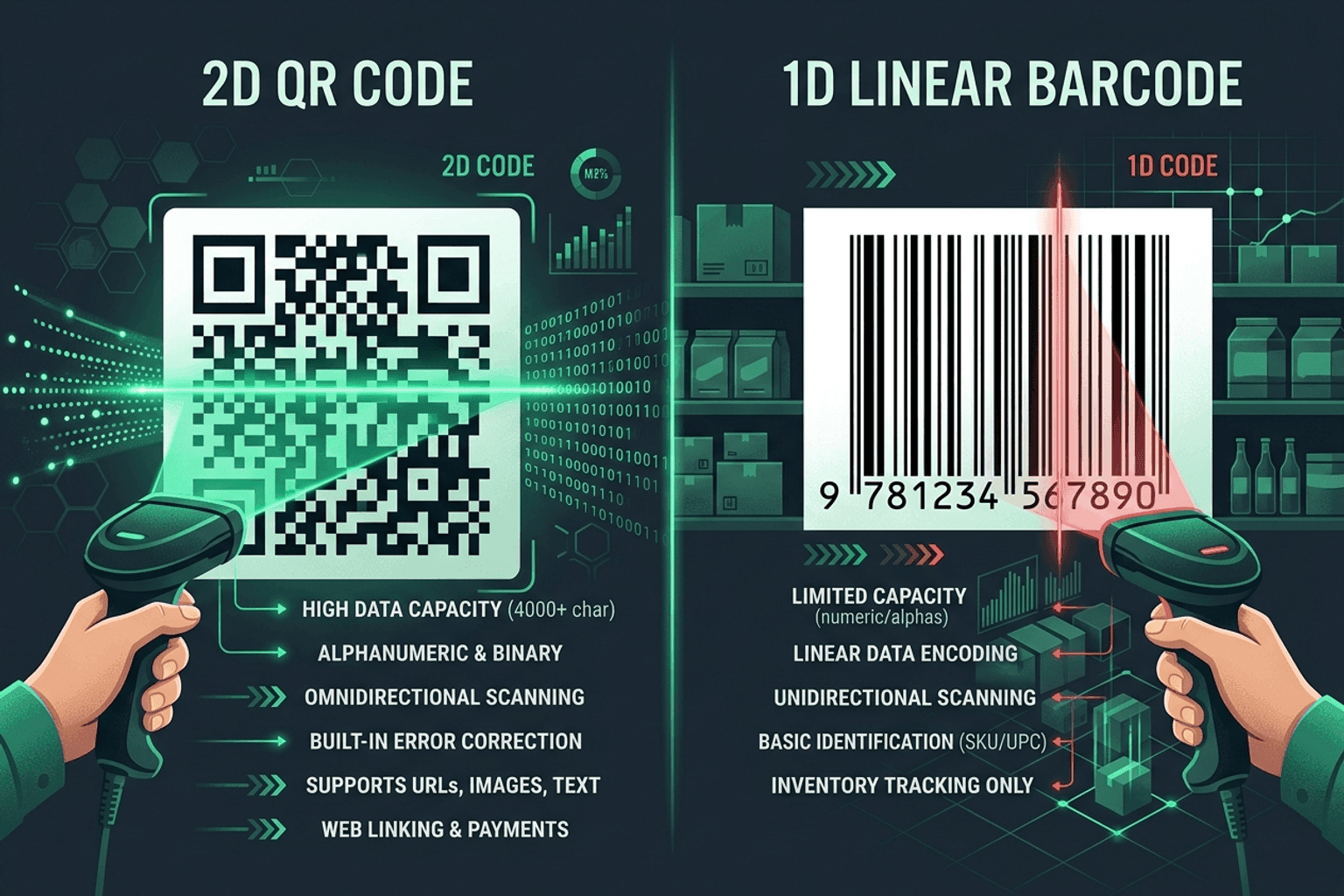
Whether you are printing product packaging for a retail store, designing event tickets, or organizing a warehouse shelf, you will face the same foundational question: Should you use a traditional 1D barcode or a 2D QR code?
Both encode data into machine-readable patterns, but they solve completely different practical problems. Choosing the wrong format can cause checkout delays, scanning failures in dim warehouses, or customer confusion when someone tries to scan a 1D barcode with a standard smartphone camera app.
Use Scan QR & Barcodes to test and decode both formats live through your webcam or mobile camera.
The fundamental difference: 1D vs 2D
The difference comes down to dimensions and data architecture:
- 1D Linear Barcodes (e.g. UPC-A, EAN-13, Code 128): Data is stored horizontally across vertical parallel bars and spaces. They typically hold only 8 to 30 characters (usually a numeric SKU, item number, or serial code).
- 2D Matrix Codes (QR Codes, DataMatrix): Data is stored in a grid of square modules both horizontally and vertically. They can hold thousands of characters, including full website URLs, Wi-Fi credentials, contact cards (vCards), and structured text.
1D Barcode (Horizontal Only) ──> [ |||| | ||| || ]  ──> Limited to short SKU numbers
2D QR Code (Grid 2D Matrix)  ──> [ █ ▄ █ ▄ █ ▄ █ ]  ──> Holds URLs, text, complex data
Side-by-side comparison
| Feature | 1D Linear Barcode | 2D QR Code |
|---|---|---|
| Data Capacity | Low (8–30 characters) | High (up to 4,296 alphanumeric characters) |
| Data Types | Numbers, basic alphanumeric | URLs, rich text, binary, vCards, Wi-Fi keys |
| Scanner Hardware | Laser scanners or specialized cameras | Any smartphone camera, webcam, or 2D imager |
| Scan Angle | Linear alignment required (horizontal line) | 360° omnidirectional (scan from any angle) |
| Built-in Error Correction | Minimal (checksum digit) | Up to 30% damage tolerance (Reed-Solomon) |
| Best Used For | Supermarket checkouts, retail inventory, shipping cartons | Marketing flyers, menus, Wi-Fi access, tickets, links |
When to choose a 1D Barcode
Stick with standard 1D linear barcodes when:
- You are selling physical products in retail: Supermarket POS systems, GS1 supply chains, and retail cash registers expect UPC-A or EAN-13 standards.
- You have long, narrow label space: 1D barcodes like Code 128 fit easily on skinny medical vials, shelf price tags, or cable tags.
- You are running warehouse logistics: Industrial laser scanners on forklifts can read high-contrast linear barcodes from several feet away along warehouse aisles.
Need to create standard retail or warehouse barcodes? Use our free tools for Code 128, Code 39, or EAN-13.
When to choose a QR Code
Switch to a 2D QR code when:
- Customers will scan with their phones: Standard camera apps on iPhone and Android immediately recognize QR codes and open links without special scanner software.
- You need to link to web content: Direct users to restaurant menus, app store downloads, support portals, or payment gateways via Website QR Code.
- Labels may get scratched or dirty: QR codes have built-in error correction levels (L, M, Q, H). A QR code with Level H correction can still be read even if 30% of the surface is covered or torn.
- You want one-tap actions: Share office Wi-Fi with Wi-Fi QR, or contact info with vCard QR.
Testing your codes before bulk printing
Never print 5,000 product labels or flyers without testing physical print samples:
- Generate your code using NeedAnyTool's generator.
- Print a single test proof at the exact scale you plan to publish.
- Open Scan QR & Barcodes or your smartphone camera in varied lighting (low indoor light, direct sunlight).
- Verify that the decoded output matches your expected SKU or link destination perfectly.
FAQ
Can a phone camera scan a normal 1D barcode?
Most native smartphone camera apps prioritize 2D QR codes and will not automatically pop up links for 1D UPC barcodes. However, you can scan 1D barcodes instantly in any web browser using our free Scan QR & Barcodes tool.
Do QR codes expire?
Static QR codes contain the literal text or URL encoded directly into the pattern and never expire. As long as your destination website remains live, the QR code will work forever.
What is the smallest recommended size for a QR code?
For standard business cards and flyers scanned from 8–10 inches away, make the QR code at least 2 x 2 cm (0.8 x 0.8 inches). For posters viewed from 6 feet away, aim for at least 15 x 15 cm.
17 on-device QR & barcode tools — nothing uploaded.
Related guides
QR Guides
Test a QR Code Before You Print It
Check a QR code before it goes on a poster, menu, or sticker. Test the link, the contrast, and a phone scan so the print actually works.
QR Guides
How to Scan a QR Code in Your Browser (Camera)
How to scan a QR code in your browser with the camera — decode codes on-device, free, no app install, no upload, no signup.
QR Guides
Scan Barcodes Live — Camera, No App
Scan barcodes and QR codes with your camera in the browser — no app install. Read product, warehouse, and event codes instantly.